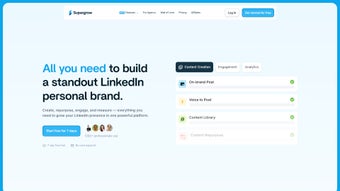

Download Supergrow – AI‑Powered LinkedIn Content Creator
Overview of Supergrow
In today’s hyper‑connected professional world, a strong LinkedIn presence can be the difference between landing a dream job, winning a new client, or simply staying invisible in a crowded feed. Supergrow steps into that arena as a web‑based AI writing assistant that is purpose‑built for LinkedIn professionals. Unlike generic AI copy tools, Supergrow tailors its suggestions to the nuances of LinkedIn’s algorithm, audience expectations, and the personal brand of each user.
The platform operates on a subscription model, offering a secure, cloud‑hosted environment where you can generate content ideas, draft high‑quality posts, and design eye‑catching carousel slides—all without leaving your browser. Its intuitive interface allows you to select from a library of pre‑written templates, customize tone and length, and even schedule posts to go live at optimal times. Whether you are a seasoned marketer, a startup founder, or a job seeker looking to showcase expertise, Supergrow’s blend of AI‑driven creativity and LinkedIn‑specific best practices makes it a compelling addition to any professional’s toolkit.
The service also includes a content‑inspiration hub, draft‑saving capabilities, and multimedia integration (videos, photos, GIFs, emojis) that keep your feed lively and engaging. In short, Supergrow is more than a writing assistant—it is a strategic partner that helps you grow visibility, credibility, and connections on the world’s largest professional network.
Key Features That Power Your LinkedIn Strategy
- AI‑Generated Content Ideas: Instantly receive topic suggestions based on your industry, role, and recent trends.
- High‑Quality Post Drafts: One‑click generation of fully formatted LinkedIn posts with optimal length, headings, and hashtags.
- Carousel Maker: Ready‑to‑use carousel templates that you can customize with images, videos, and GIFs for maximum visual impact.
- Template Library: A collection of proven post structures (thought‑leadership, case studies, announcements) that you can adapt in seconds.
- Scheduling Engine: Drag‑and‑drop calendar to set publishing times, automatically handling time‑zone differences.
- Multimedia Integration: Seamless embedding of videos, photos, and emojis, plus a live preview to ensure perfect formatting.
- Draft Management: Save ideas as drafts, organize them by tags, and revisit whenever inspiration strikes.
- Role‑Based Automation: Configure the AI to produce content aligned with specific job titles (e.g., “Product Manager”, “HR Director”).
- Analytics Snapshot: Basic performance metrics (views, likes, comments) displayed directly in the dashboard to guide future posts.
- Secure Cloud Storage: All drafts and scheduled posts are encrypted and stored on compliant servers, ensuring your data remains private.
Why These Features Matter
Each feature of Supergrow is designed to eliminate a friction point in the LinkedIn content workflow. The AI‑generated ideas cut down brainstorming time, while the post drafts guarantee that you never compromise on quality or relevance. Carousel creation, often a manual and time‑consuming task, becomes a few clicks with pre‑built templates that still allow brand‑specific customization.
Scheduling removes the need for daily logins, freeing you to focus on engagement rather than logistics. Moreover, the role‑based automation means the language, tone, and industry jargon automatically align with your professional identity, increasing authenticity and audience resonance. By integrating multimedia and a live preview, Supergrow ensures your posts look polished across devices before they go live.
Finally, the secure cloud environment and draft management system give peace of mind that your intellectual property is safe and well‑organized. Together, these capabilities turn the often daunting task of LinkedIn content creation into a streamlined, strategic process.
Installation, Usage & Compatibility
Getting Started – No Download Required
Supergrow is a fully web‑based application, which means there is no traditional software to install on your computer. To begin, visit the official Supergrow website and click the “Start Free Trial” button. After entering your email address and choosing a subscription plan (monthly or annual), you’ll receive a verification link. Once verified, you’ll be directed to the dashboard where the AI tools are ready for immediate use. Because the platform runs entirely in the browser, it works on any modern operating system—Windows, macOS, Linux, ChromeOS—as long as you have a stable internet connection and a recent version of Chrome, Edge, Firefox, or Safari.
Step‑by‑Step Workflow
- Set Your Profile: Fill out your industry, job title, and preferred content style (formal, conversational, thought‑leadership). This information powers the AI’s contextual understanding.
- Generate Ideas: Click “Idea Generator” and type a keyword or let the AI suggest topics based on recent trends.
- Choose a Template: Browse the library, select a template that matches your goal (e.g., “Industry Insight”), and let the AI fill in the blanks.
- Customize & Add Media: Insert images, videos, or GIFs using the built‑in media uploader. Use the emoji picker to add personality.
- Preview & Edit: Switch to the preview tab to see how the post will appear on LinkedIn. Make any final tweaks to headlines, hashtags, or formatting.
- Schedule or Publish: Choose “Schedule” to set a future date and time, or click “Publish Now” to send the post directly to your LinkedIn account (after connecting via OAuth).
- Track Performance: After publishing, return to the dashboard to view basic engagement stats and refine future content strategies.
Compatibility and System Requirements
Supergrow is compatible with the following operating systems and browsers:
- Windows 10, 11 – Chrome, Edge, Firefox, Safari (latest)
- macOS 12 Monterey and later – Chrome, Safari, Firefox
- Linux distributions with recent Chromium‑based browsers
- ChromeOS – Chrome browser
- iOS 14+ & Android 9+ – Mobile browsers (functionality is optimized for desktop but basic features work on tablets)
Because Supergrow relies on cloud processing, the only hard requirement is a reliable internet connection with at least 2 Mbps download speed. The platform also uses end‑to‑end encryption for data in transit, complying with GDPR and CCPA standards, so you can feel confident that your drafts and scheduled posts remain confidential.
Pros, Cons, Frequently Asked Questions & Final Thoughts
Pros
- AI generates platform‑specific content ideas, saving hours of brainstorming.
- Built‑in carousel maker eliminates the need for separate design tools.
- Scheduling feature automates posting, reducing daily login friction.
- Secure cloud storage keeps drafts private and accessible from any device.
- Role‑based automation tailors tone and terminology to your professional identity.
Cons
- Requires an internet connection; offline usage is not supported.
- Limited advanced analytics; only basic engagement metrics are provided.
- Subscription pricing may be a barrier for freelancers on a tight budget.
- Mobile experience is functional but not as fluid as the desktop version.
- Customization of carousel templates, while robust, still follows a set layout structure.
Frequently Asked Questions
Is Supergrow only for LinkedIn?
Currently, Supergrow is optimized for LinkedIn’s formatting, character limits, and algorithmic preferences. The AI can still generate generic social‑media copy, but the best results are achieved within LinkedIn’s ecosystem.
Can I cancel my subscription at any time?
Yes. Subscriptions are month‑to‑month or annual with automatic renewal. You can cancel via the account settings page, and you’ll retain access until the end of the current billing cycle.
Does Supergrow integrate with my existing LinkedIn account automatically?
Integration uses LinkedIn’s OAuth process. You’ll be prompted to authorize Supergrow once, after which the app can schedule and publish posts on your behalf without needing further logins.
Are there any hidden fees for media uploads or carousel creation?
All media uploads, carousel templates, and AI generation are included in the subscription price. There are no extra charges for storage or additional templates.
How secure is my data on Supergrow?
Supergrow employs SSL/TLS encryption for data in transit and AES‑256 encryption for data at rest. The service complies with GDPR and CCPA, and you can delete any draft or scheduled post at any time.
Conclusion – Elevate Your LinkedIn Game with Supergrow
If you’ve ever felt stuck staring at a blank LinkedIn post box, Supergrow offers a practical, AI‑driven solution that turns the creative block into a streamlined workflow. Its blend of idea generation, high‑quality drafting, carousel design, and automated scheduling aligns perfectly with the demands of busy professionals who need to stay visible without sacrificing time. While the subscription cost and reliance on an internet connection are considerations, the productivity gains and the ability to consistently publish polished, engaging content make Supergrow a worthy investment for anyone serious about building a personal brand or driving business growth on LinkedIn. Ready to experience a more efficient, creative, and data‑backed approach to LinkedIn publishing? Start your free trial today and watch your network expand, your engagement rise, and your professional influence grow—one intelligently crafted post at a time.



.png)



